

Welcome to IDS
Success Stories
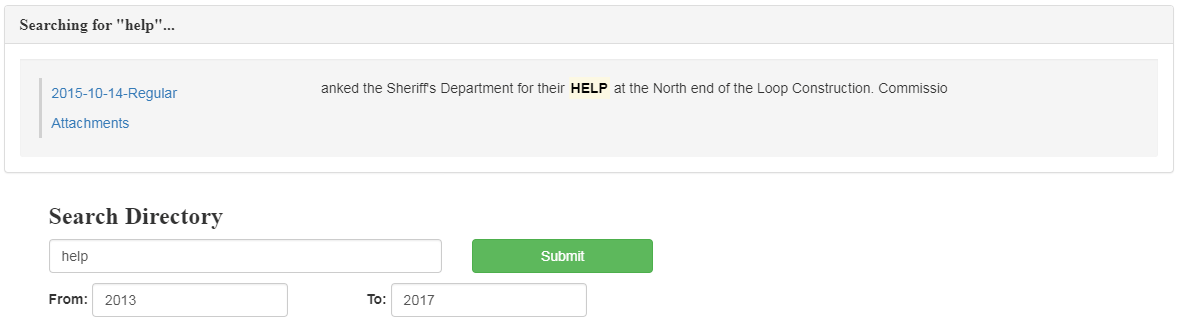
The County Clerk at Johnson County was spending a lot of time looking back through commissioner’s court minutes to verify information. When was CR204 purchased? Who voted on this decision? At that time their system had a keyword search, not a string search. It also had no way to limit searches to a relevant time period. IDS’s solution made finding relevant records much easier, and less time consuming. By making the search available on the web, searches did not have to come through the County Clerk’s office, thus saving an even greater amount of county personnel time. It also proved very effective in county commissioner court meetings, by providing instant access to past decisions.
Integrated Data Services is an IT outsource company located in Sulphur Springs, Texas. The typical office or local authority has several systems provided by different vendors. IDS completely links these systems together, and makes them work seamlessly across a business or local authority. This programming expertise in working with vendor API’s is what differentiates IDS from other service companies. IDS has experience in linking systems for a large variety of vendors.





Services Provided
-
Data Integration
Automated Data Management Solutions for any sized business -
Interactive Websites
Customized, responsive, fully functional websites made by IDS -
Lyceum HOT
A classroom management software for law enforcement -
Easy Docs
Searchable, indexed, and interactive document management application -
Customized Software
Whatever you need, we've got your back.
Data Integration
How many systems exist in your office/business? There’s endless amount of copying, pasting, file importing/exporting, system updating, etc. There are always communication issues. Reports have to be run when no one else is signed into the system.
IDS specializes in creating portals between disparate systems, reducing labor and eliminating the headaches. Accuracy is improved, security enhanced, and the systems are continually live.
Predominantly working with small to medium businesses and local government, IDS specializes in creating portals and integrating data between systems. In addition IDS, can take your custom software, developed specifically for your application, and build a portal to any vendors software, using their API.
Interactive Websites
IDS is an IT outsource company located in Sulphur Springs, Texas. The typical office or local authority has several systems provided by different vendors. IDS developed a competence in linking these systems together, and making these systems work seamlessly across a business or local authority. This programming expertise in working with vendor API’s is what differentiates IDS from other service companies. IDS has experience in linking systems for a large variety of vendors.
Customized Software
IDS has developed custom software for many applications. One of the typical applications is gathering data from disparate systems, analyzing the data and preparing a report.
Case Study: Tim-Kil (Insert logo)
Tim-Kil owns a chain of KFC restaurants. Tim-Kil wanted to benchmark their managers performances against each other. KFC corporate systems didn’t allow the same drill down on waste, inputs and outputs. The system analyzed the ingredient yield versus what was sold and determined a level of waste efficiency for each store. Tim-Kil used this system as part of their compensation structure for their store managers.
For a customized software solution please contact IDS
Read More about Lyceum!
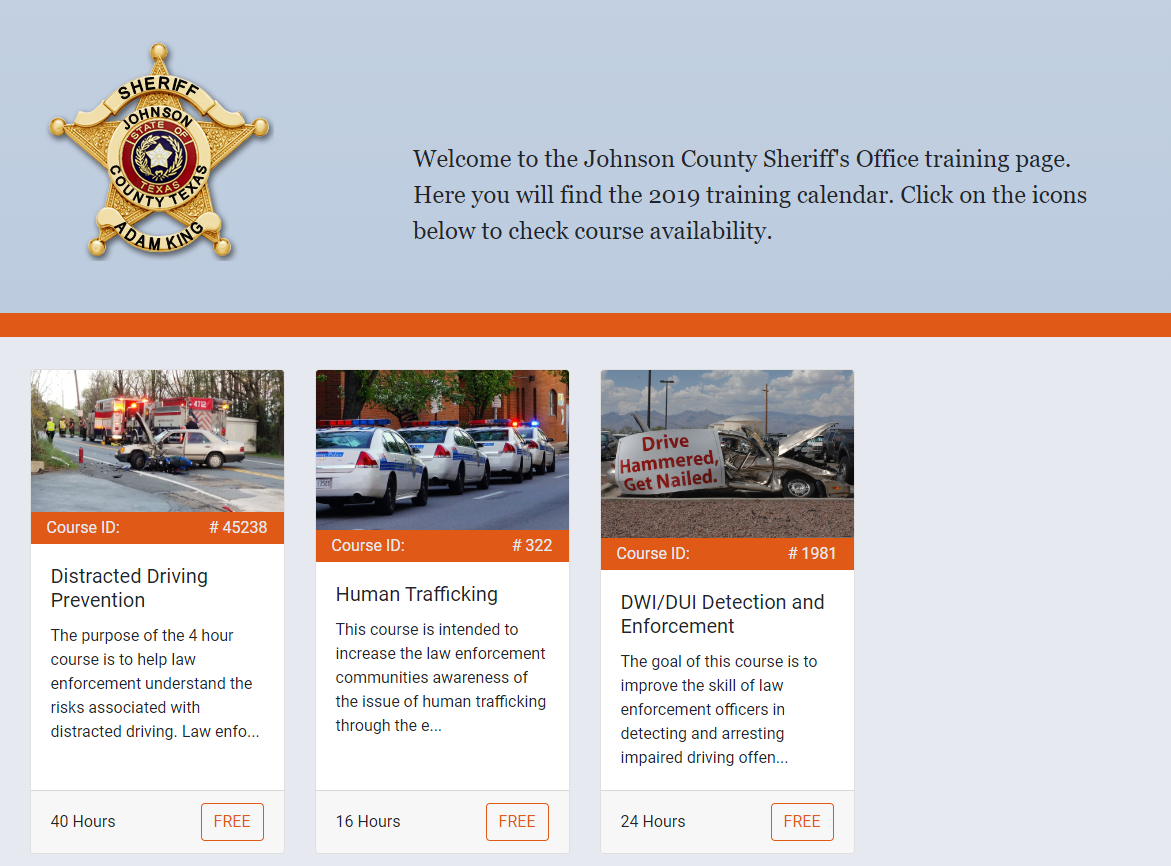
A Classroom Management Software used in Law Enforcement!
Lyceum
A Classroom Management Software
Virtual classrooms are fine for some things, but let's be honest, nothing can substitute for classroom education. The problem is, managing classes can be time consuming and tedious. That's why we created Lyceum!
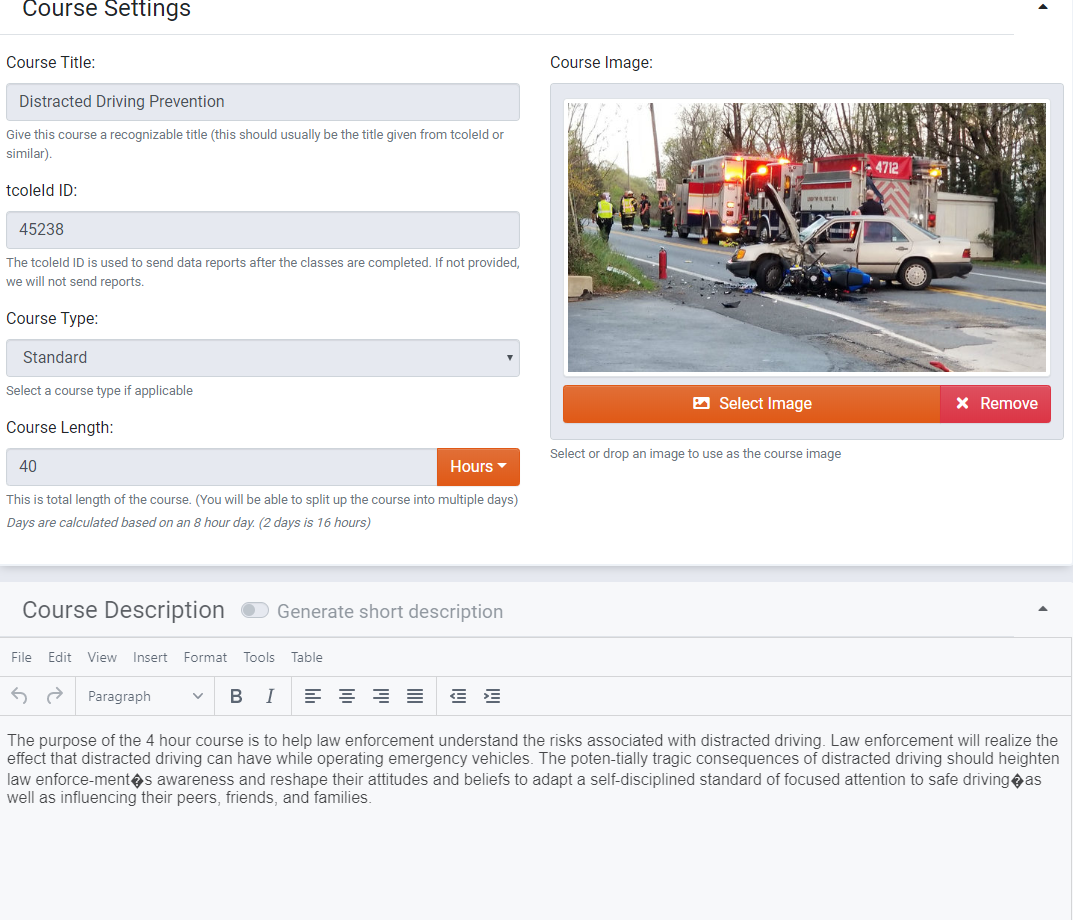
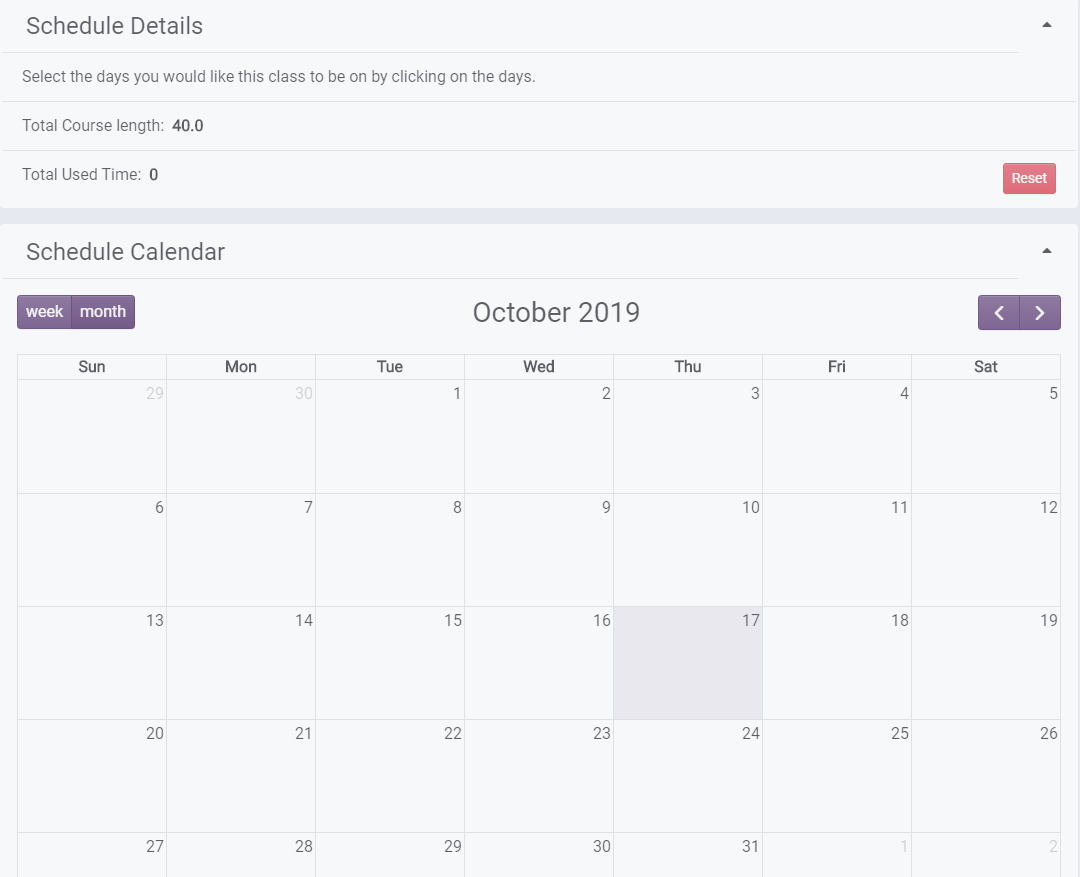
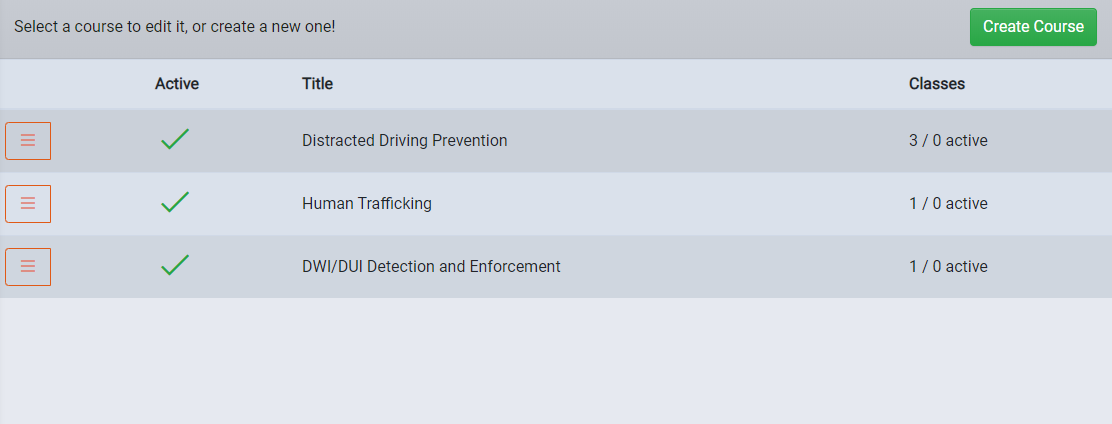
Create and schedule courses with drag and drop ease. Classes show up on the web where students are able to choose when and where to enroll from any platform, whether it be on the go from their phone, or from the computer at work.
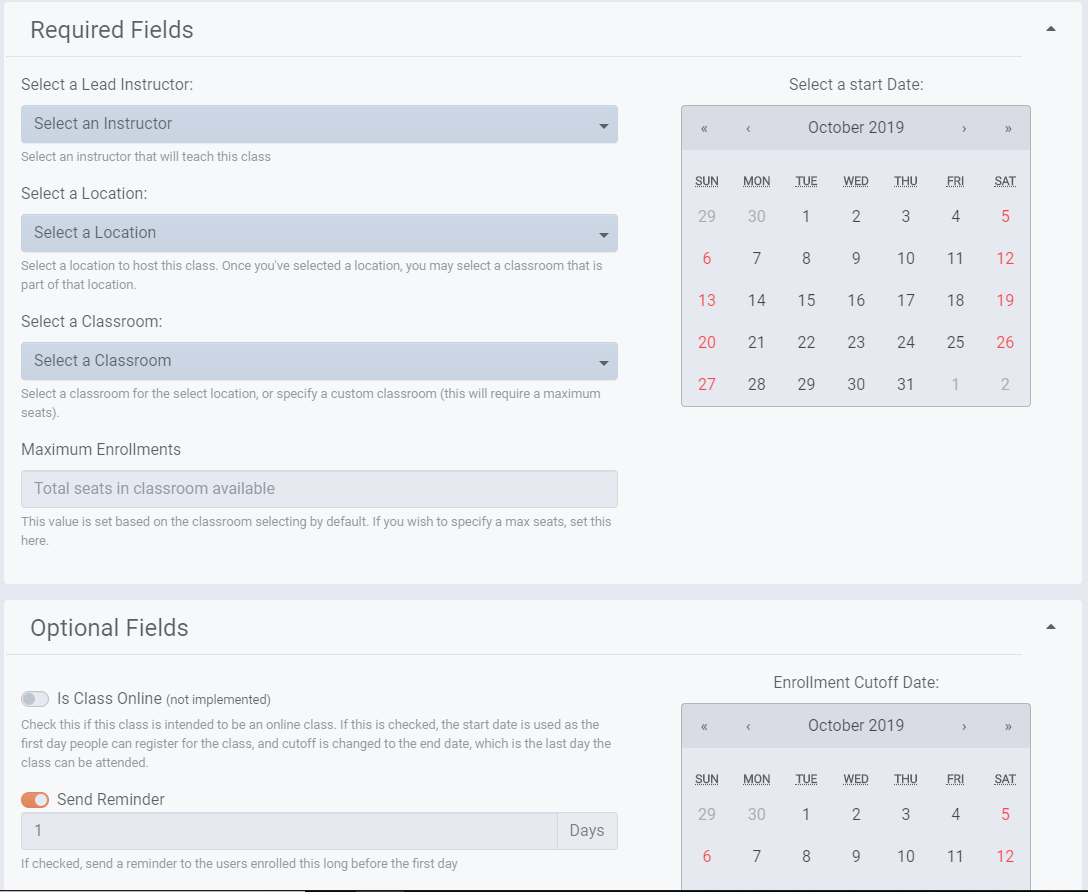
Manage and schedule coureses, set up classrooms, view student history, assign instructors, and much more.
Cloud-Based
A single platform in the cloud collects critical data, managements enrollments, allows for rapid development and easily deployable updates to ensure that you are always using the most up-to-date software.
Cross Platform Support
Lyceum was designed with a mobile-first design approach, meaning we know that most people browsing the web are usually on their phones, and we've designed Lyceum with that in mind. You'll have a great experience from a smartphone, or a desktop, it doesn't matter!
AIO Administration
Everything you need to get started with Lyceum is available in a dashboard built from the ground up. Administer courses, schedules, manage users, and locations, and much more. If you ever get stuck, we've also integrated helpful documentation for each page as well
Automation
Sometimes administrators may want to send out reminders for classes, or create the ability to automatically enroll new users when space opens up. Lyceum has built-in features that allow for this! Set up reminder times, and our servers will automatically handle the rest for you!


Easy Docs
Do you have documents that need to be made available to the public or within your organization? Do these documents need to be searchable so they can be referenced? Are you legally required to post your organization's records, minutes, agendas, etc?
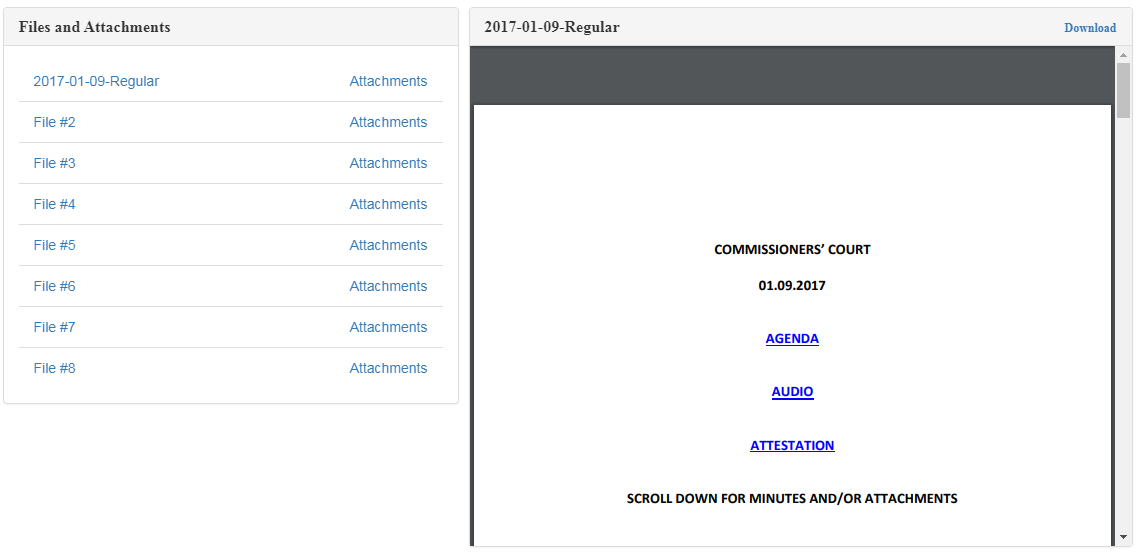
Developed specifically for the needs of Texas County Commissioner's Court, IDS’s “Easy Docs Suite” makes finding and referencing records extremely easy. No longer do you have to know the exact date of a meeting. Instead type in the phrase or reference you are looking for. If required, you can limit your search within a span of years.
Once the solution is installed, records can be published, or redacted instantaneously, with no IT involvement. With an elegant and simple to use interface the program is intuitive and easy to operate. Additionally, through the use of links in the main documents, all supporting documentation relevant to any given set of meeting minutes can be included in the published records.
Uses for this include County Commissioners Court, public company compliance records, school board minutes, or incident reports.
How does it work?
This video provides a brief summary of all the programs in the EasyDocs Suite.
Did you know that EasyDocs is a suite of programs each catered to specific types or documents and purpose of publishing
First, there's the Publish Content Program which is the simplest, perfect for creating bulletin boards and news pages.
second, there's the Publish Documents Program which is the most common, typically used to Publish meeting documents, but can be used for a variety of purposes.
Thirdly is the Publish category Program which organizes your published documents based on user defined categories.
To take it a step further is the Publish Category Year Program which organizes categories into years, perfect for year by year election filings.
lastly, there's the Publish Date Program which can limit it's display based on a specific time frame.
Watch this video tutorial for more detail and a visual showcase of each.
EasyDocs Summary
This video for the EasyDocs Publishing Suite covers the scanning and naming of documents and attachments that will be published.
Scanning your documents depends heavily on your hardware and software you use. While EasyDocs is not a scanning program, we can recommend NAPS if you're in need of scanning software, it free, open source, and easy to use.
Naming your documents properly after you scan them is vital to avoid strange and unwanted behavior not just in the EasyDocs Suite but with a great many windows programs. For your document name, we recommend a two digit number like 01 to 99 followed by the document name, or a section then number such as A01 to Z99. We also recommend keeping you document name to a maximum of 20 characters long as some windows programs dislike names with higher character counts. And most importantly, do not use the following Characters at all in your document name: % ^ , # + ` [] {} | /\ : * ? “ <>
Watch this video tutorial for a step by step visual explaination.
Scanning and Naming
This Tutorial for the EasyDocs Publishing Suite covers the replacing of Attachments linked to documents of certain dates.
Since easyDocs allows you to easily replace attachments to publish on your schedule, No more waiting on everything to be there before publishing. For example, you can publish before a signed contract is available, When the signed contract comes in, you simply need to replace the unsigned one with the new one.
First, open your EasyDocs publishing program.Then enter the date of the document you want to replace attachments for. Then choose the meeting type from the drop-down menu. Then go to File -> Maintain Links. The Maintain Links window should now be populated with a list of attachments linked to that document. Select the attachment you want to replace from the list by clicking on it. Then, locate the new attachment and drag and drop it into the linked file input field above the list. It’s normally in the attachment or links folder under easyDocs. Then hit publish.
Watch this video tutorial for a step by step visual explaination.
Replacing Attachments
If you've made any mistakes or have incorrect documents when publishing with the EasyDocs suite you don't have to worry, you can easily find and republish you documents without needing to re-scan everything.
First open your EasyDocs program and go to Configuration. At the bottom, find the Archive directory path. EasyDocs will archive your documents and links for just this purpose, ensuring that nothing is deleted even if you’ve clicked the clear links folder button when publishing. Now go to the Archive directory path. Now you’ll see the documents and links folders for everything you’ve published. Find the pair with the matching date and type. Now we simply move the Document back to the folder you published from. And then open the archived links folder and move the files inside to the original empty links folder. Now that your document and links are retrieved, you can publish it again as normal after all the issues have been fixed.
Watch this video tutorial for a step by step visual explaination.
Republishing
This video covers framing the EasyDocs Webviews within your own website and how to filter and sort your documents using the webviews URL.
You can frame you Easydocs webview within your own websites in the case that you do not want to link to the web view itself. If you do want the EasyDocs webview framed, please call us at 903-243-1208.
Filtering the documents of your web view involes typing at the top of your browser, appended to the end of the URL ?yr=last&newest=1&pattern=special. This command will tell the webview to display the most recently published document of the 'Special' type.
Another function, this time in the Publish Content program is the ability to give your Documents static names before publishing, perfect for documents that have the same kind of content but are continually named differently.
Watch this video tutorial for a step by step visual explaination.
Framing and Filtering
If you require the attachments to your documents to also be searchable this video will show you how to achieve that.
To start, making attachments searchable requires that you've already published the document that the attachment is associated with.
Now we open the Publish Documents program and enter in the date and type of the parent document. Then we drag the desired attachment or a doc that has the desired information over to the Word Doc field. Finally we go to File -> New Secondary Search and in that window enter the description of the attachment you are making searchable, then click publish.
That should be everything needed to make your attachment searchable. Watch the video tutorial for a step by step visual explaination.
Making Attachments Seachable

Who are we?
Located in Sulphur Springs, Texas, IDS is a short drive from the Dallas / Ft Worth metroplex. IDS was founded in 1997 by Bill Wilder. Bill holds a computer science and business degree from Texas A & M University in Commerce. Prior to establishing IDS, Bill worked for a veriety of software developers. He has over 30 yeas experience in software engineering, design, development, and implementation.
IDS focuses on making disparate pieces of software work with each other. Predominantly working with local authorities and regional businesses, IDS has carved out a successful niche making different systems within businesses and local government communicate, making life easier and more productive for the end users.
Devin Mitchell is a fullstack web developer with 6 years of real-world programming experience and joined the team in September 2017. He is responsible for creating highly customized, data-driven web applications and has experience working with several programming languages.
IDS draws from a team of professionals located all over Texas. Each provides specialist expertise ranging from hardware to security, as well as business process engineering. IDS is not just another software vendor. IDS looks at the business/government need and provides the linking pieces between legacy systems and newer applications.
Get in Touch!
Send us Mail
Integrated-Data4799 FM 71 E
Dike, TX 75437
Give us a Call
Office: (903) 243-1208
Mobile: (903) 243-1208
Send us an E-mail
Primary: [email protected]